September 11, 2026
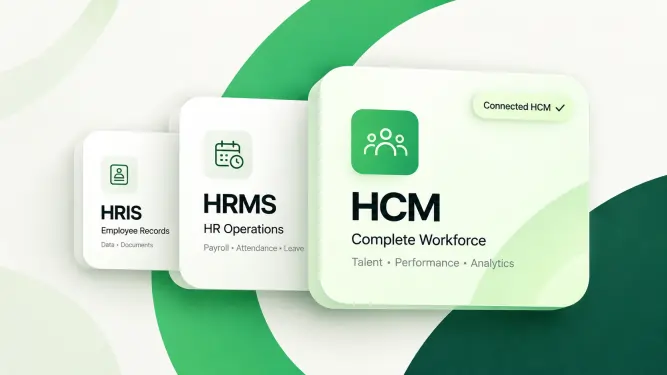
Quick answer: HRMS vs HRIS vs HCM is mostly a question of scope. An HRIS (Human Resources Information System) stores and organises employee data, an HRMS (Human Resource Management System) runs the daily processes built on that data, such as attendance, leave, payroll and approvals, and HCM (Human Capital Management) adds talent, performance and workforce planning on top. Most UAE companies under about 50 people need a solid HRMS with WPS payroll, while HCM features start paying for themselves as headcount, entities and Emiratisation targets grow.
“Which one are we buying?” the CFO asks. His message reaches the HR director of a 160-person catering company in Ras Al Khor late on Thursday, a few hours after the third vendor of her week closed his laptop and left the meeting room above the main kitchen.
Monday’s salesperson called his product an HRIS. Wednesday’s sat in the same chair with a different logo and a different deck, and sold an HRMS. Thursday morning brought a laptop sticker that read “Next-generation HCM”.
All three demos showed her the same leave request screen. All three promised payroll. All three said they were built for growing companies. Yet the prices sit far apart, and each vendor hinted that the other two were selling “something smaller”.
She writes the three acronyms on the glass wall of her office and draws a question mark under each.
She can’t answer yet, and most HR leaders in her seat couldn’t either. The industry uses these labels loosely and rarely explains them. This guide does: plain definitions you can quote to your CFO, a side-by-side comparison table, real examples of what each system covers, and a decision guide that matches HRIS, HRMS or HCM to your company’s size and stage in the UAE.
Start with the words themselves. In the HRMS vs HRIS vs HCM debate, each acronym describes a scope, not a brand, and the scopes nest inside one another.
HRIS (Human Resources Information System) is software that stores, organises and reports on employee data. It is the system of record: who works for you, in which role, on what contract, with which documents, reporting to whom. Its main job is to make that information accurate, secure and easy to find.
HRMS (Human Resource Management System) is software that runs HR processes on top of that record. It handles the work that happens every day and every month: attendance, leave, payroll, onboarding, approvals and employee self-service. Its main job is to turn HR data into completed transactions.
HCM (Human Capital Management) is a broader suite that treats the workforce as an asset to plan and develop. It includes everything an HRMS does and adds recruitment strategy, performance, talent and career management, succession, competencies and workforce analytics. Its main job is to connect people decisions with business plans.
If you need a one-line memory aid, use this one: an HRIS knows, an HRMS does, and an HCM plans.
Picture three rings, one inside the next. The HRIS is the inner ring, the employee database. The HRMS wraps around it and adds processes that read and write that data. The HCM wraps around both and adds the long-range view.
That nesting explains why the demos in Ras Al Khor looked alike. Every HCM contains an HRMS, and every HRMS contains an HRIS. The leave screen sits in the middle ring, so all three vendors could show it. The differences only appear when you ask what lies outside the middle.
For the wider market, with ten platforms set side by side, the UAE and GCC HR software guide is the place to start.
The table shows how the three labels are usually positioned. Treat it as a map of typical scope, not a guarantee about any single product.
| Area | HRIS | HRMS | HCM |
|---|---|---|---|
| Employee records and documents | Yes | Yes | Yes |
| Organisation structure | Yes | Yes | Yes |
| Leave management | Often basic | Yes, with approvals | Yes |
| Attendance and timesheets | Sometimes | Usually | Usually |
| Payroll | Limited or none | Common | Common |
| UAE payroll detail (WPS SIF file, gratuity) | Rare | Varies by vendor | Varies by vendor |
| Recruitment | Limited | Often | Yes, with talent pipelines |
| Onboarding | Basic checklist | Yes | Yes |
| Performance management | Limited | Often | Strong |
| Employee engagement | Limited | Often | Strong |
| Workforce planning | Limited | Some platforms | Strong |
| Talent, succession and competencies | Rare | Sometimes | Common |
| Workflow automation | Limited | Stronger | Advanced |
| Analytics | Headcount reports | Operational reports | Strategic analytics |
| Best suited for | HR administration | HR operations | Strategic workforce management |
No standards body owns these terms. HRIS is the oldest, from the days when HR software meant a database of personnel files. HRMS spread as payroll, attendance and leave modules joined that database. HCM is the label large global suites prefer, because it signals strategy as well as administration.
Vendors pick whichever acronym suits their positioning. A small product can call itself HCM. A large one may say HRMS because, in the Gulf, many buyers use it as the everyday word for HR software. The label tells you where a vendor wants to be seen. The modules, and how they handle UAE rules, tell you what you are buying.
An HRIS is the foundation. It replaces scattered employee information with one central, permissioned source of truth.
Think of a distribution company with 80 people. Its employee information lives in six places: a master spreadsheet, a visa tracker, scanned passports in a shared drive, offer letters in email, a fingerprint reader export and the payroll file finance keeps to itself.
Each works on its own. The trouble starts when they disagree. A driver is promoted to supervisor, and his title changes in the master file but not in payroll. A manager asks for a leave balance, and HR checks three sources before replying.
An HRIS fixes this by holding one record per person, with history, so every later process starts from the same facts.
A generic HRIS records a name, a role and a salary. An HRIS UAE companies can rely on has to hold more, because so many local processes depend on specific fields being right.
If an HRIS cannot hold these cleanly, every system you connect to it later will inherit the gaps.
An HRIS on its own fits when your main problem is information, not process. A typical trigger sounds like this: “We grew from 20 to 80 people, and our HR data now lives in five spreadsheets that never agree.”
An HRIS solves that. It does not, by itself, approve leave, calculate overtime or produce a salary file. If you also need payroll, attendance, structured approvals or reviews, a basic HRIS soon feels like a tidy filing cabinet that still needs a person for every job. That is when an HRMS makes more sense.
Where an HRIS stores information, an HRMS uses it. It manages the processes that make up an employee’s working life and passes data between them automatically.
Follow one employee through a year. She is onboarded, clocks in daily, takes leave twice, works overtime in a busy quarter, is paid monthly through WPS and is promoted in December. Each moment creates data, and each one affects another. An HRMS connects them.
Attendance to payroll. Overtime and unpaid absence should reach payroll without anyone retyping them. Take a storekeeper whose basic pay is AED 4,500. His hourly basic rate is AED 18.75 (4,500 ÷ 30 ÷ 8). Ten approved overtime hours at the standard 25% uplift come to 10 × 18.75 × 1.25 = AED 234.38. An HRMS calculates that from the approved hours. A spreadsheet relies on someone remembering the formula.
Employee record to leave. Entitlements depend on the profile. Leave builds at two days a month once six months are served, then becomes 30 calendar days for each full year, so the joining date in the record drives the balance.
Recruitment to onboarding to core HR. When a candidate accepts an offer, their details should flow into onboarding tasks and then into the employee record. Nobody should type the same passport number three times.
Approvals to everything else. A leave approval should update the attendance calendar and the payroll period. An overtime approval should reach the pay run. A document approval should update the employee file.
| Module | What it does | UAE detail to check |
|---|---|---|
| Core HR | Central employee records and history | Holds visa, Emirates ID, labour card and contract end dates with alerts |
| Attendance | Web, mobile, GPS, face or biometric check-ins, timesheets, overtime | Knows the 8-hour daily limit, the 48-hour weekly cap, overtime premiums and the shorter Ramadan day |
| Leave | Requests, approvals, balances, calendars, history | Annual, sick (15 days full pay, 30 half, 45 unpaid), maternity, parental, bereavement and study leave |
| Payroll | Salary, overtime, deductions, final settlements | Produces the WPS SIF file and calculates gratuity at 21 and 30 days of basic wage |
| Recruitment | Openings, candidates, interviews, offers | Moves the hire into onboarding without retyping |
| Onboarding | Tasks and approvals for new joiners | Tracks visa, medical and Emirates ID steps |
| Performance | Goals, KPIs, reviews, ratings, feedback | Supports probation reviews within the six-month limit |
| Workflow automation | Routes requests through approval chains | Handles multi-level chains such as Employee, Manager, Department Head, HR, Finance |
| Self-service and mobile | Leave, payslips, attendance and requests from a phone | Serves drivers, guards and nurses as well as office staff |
A good HRMS becomes the place where HR work happens, not just where it is filed.
HCM stands for Human Capital Management, and the phrase carries a point of view. “Human capital” frames people as a resource you invest in and plan for, not a list of records to maintain. An HCM platform covers everything an HRMS does and connects the employee lifecycle with business planning.
Picture a company planning to grow from 300 to 600 people over three years. The question is not “Where will we store 300 more records?” Leadership is asking harder things:
Those are HCM questions. They need performance data, competency frameworks, succession plans, career paths and workforce analytics, all joined to the core employee record.
The Nafis rules work in steps. Once a private company reaches 50 employees, its share of skilled Emirati staff has to climb two percentage points a year, towards 10% by December 2026. Below that size, companies of 20 to 49 in listed sectors face their own requirement to hire Emiratis.
That turns Emiratisation into a planning problem, not just a reporting one. On a base of 200 skilled employees, each two-point step means four more Emirati hires. Grow that base to 300 and the same step means six. If your growth plan adds 100 skilled roles, your Emirati hiring plan has to grow with it, and so do your onboarding, development and retention plans for those hires.
An HRMS can report today’s percentage. An HCM platform helps you model next year’s. This is one reason larger UAE employers look at HCM enterprise solutions in Dubai rather than a payroll-led HRMS alone.
The simplest way to see the gap is to look at who uses each system and what they ask it.
| System | Question it answers | Who mostly uses it | Typical output |
|---|---|---|---|
| HRIS | “Where is my employee data?” | HR administrators | An accurate employee file and headcount report |
| HRMS | “How do we run HR processes efficiently?” | HR, managers, employees and payroll | Approved leave, correct salaries, a WPS file, onboarded joiners |
| HCM | “How do we manage, develop and plan our workforce?” | Leadership, HR business partners and managers | Succession plans, skills gaps, workforce cost forecasts |
The audience is the clearest tell. An HRIS is used mostly by HR. An HRMS is used by everyone, every week. An HCM platform earns its price when leadership uses it to make decisions.
The overlap is large, and modern platforms often combine all three layers. So never select software only because a vendor calls it “HCM” or “HRMS”. Ask which layers it covers well.
The labels would be trivia if buying the wrong scope were cheap. In Dubai, it rarely is.
Companies here often combine many nationalities, several sites, field staff, fast hiring, layered approvals and strict payroll rules. Many also run more than one entity. If your group spans free zones, DIFC or ADGM, see how the best HR software in UAE handles group structures and several rulebooks at once.
Buying the wrong scope fails in two directions.
Under-buying. You choose an HRIS because the data mess is the loudest pain. Six months later, payroll is still rebuilt in Excel each month, leave approvals still run through chat and the HRIS is one more place to update. The spreadsheets did not go away; they just gained a neighbour.
Over-buying. You choose a global HCM suite for a 45-person company. Implementation takes months, half the modules stay switched off, and UAE payroll may still need a local provider if the suite’s gratuity and WPS handling are thin. You pay enterprise prices for features nobody opens.
The point of understanding HRMS vs HRIS vs HCM is to match scope to need, so you neither starve nor overfeed your HR team.
Most UAE companies start HR in Excel, and for a team of eight that is perfectly sensible. The problem begins when the spreadsheet stops being a tool and becomes the infrastructure.
Consider a company with 150 people. It typically runs separate files for employee master data, attendance, leave, overtime, payroll, recruitment, performance, documents and the organisation chart. One promotion means updating four of them. One resignation means checking all nine.
The spreadsheet is not the villain. Fragmentation is. Each extra file adds another chance of:
In a straight HRMS vs spreadsheets comparison, the HRMS wins on the things that carry legal weight in the UAE: overtime calculated the same way every month, leave balances that follow the law, gratuity calculated on basic wage and a SIF file that matches the payroll register.
When you compare HR software, do not compare subscription prices alone. Price your current process too.
Suppose one HR officer spends two hours a week consolidating attendance before payroll. That is roughly 8.7 hours a month (2 × 52 ÷ 12). Add leave reconciliation, payroll preparation, routine employee questions, manual reports, document chasing and approval follow-ups, and the hours mount quickly.
Then add the cost of mistakes. Since June 2026, WPS treats a salary as due on the 1st of the following month, and repeated breaches invite MOHRE fines and can freeze new work permits. A wrong leave balance damages trust. A missing visa document becomes a compliance risk. Automation saves time, but its bigger gift is consistency.
Headcount is a useful starting point, so the table below begins there. Complexity then adjusts the answer, as the examples after it show.
| Stage | Typical headcount | What usually hurts | What to buy | UAE triggers to plan for |
|---|---|---|---|---|
| Starting out | 1 to 15 | Records in one spreadsheet, visa dates in someone’s head | HRIS-level records plus WPS-ready payroll, usually a compact HRMS | WPS from the first salary for MOHRE-registered employers; visa and Emirates ID renewals |
| Early growth | 15 to 50 | Leave by chat, payroll rebuilt monthly, overtime disputes | A full HRMS: attendance, leave, payroll, self-service, mobile | Emirati hiring rules for 20 to 49 employees in specified sectors |
| Scaling | 50 to 250 | Several managers, longer approval chains, multiple sites | An HRMS with HCM features: recruitment, onboarding, performance, analytics | Nafis two-point annual increase from 50 employees; more formal reviews |
| Complex | 250 and above, or several entities | Mainland and free zone entities, matrix reporting, succession gaps | An HCM platform with a strong UAE-ready HRMS core | Several WPS establishments, group-wide Emiratisation planning, consolidated reporting |
There is no magic employee number. A 30-person company may need a full HRMS on day one, while a 300-person company can sometimes manage without succession planning.
Take a 30-person security services firm with guards posted across twelve client buildings on rotating night shifts. It needs geofenced mobile attendance, shift rules, correct overtime (the 10pm to 4am premium does not apply to shift workers, so the system must know who is one) and a clean feed to payroll. That is HRMS territory, whatever the headcount.
Now take a 220-person software house in one office, with standard hours and few approval layers. It needs a good HRMS with performance reviews. A heavy HCM suite with competency libraries and succession modules might sit largely unused for years.
The deciding factors are the number of locations, entities, shift patterns, approval levels, workforce types and payroll rules, and how fast you plan to grow.
Company A: a 25-person trading company in Deira. Records live in Excel, leave is tracked on a shared sheet, and one person handles HR alongside accounts. The main pain is information and payroll. An HRIS-style record plus WPS payroll is enough today, ideally inside an HRMS that can switch on attendance and self-service later.
Company B: a 180-person freight and logistics firm in Jebel Ali. It has drivers, warehouse crews and an office team, monthly payroll with heavy overtime, leave approvals across three managers, steady recruitment and annual reviews. It needs to automate operations, not just store data. An HRMS is the right fit, with performance and onboarding switched on.
Company C: a 2,000-person hospitality group. It runs hotels in Dubai and Abu Dhabi through a mainland management company, with a free zone holding entity on top. It needs multiple entities, complex workflows, workforce planning, talent development, succession and group reporting. A broader HCM platform fits, provided its UAE payroll core is solid.
Company size suggested the answer in each case. Complexity confirmed it.
For a small business, simplicity wins. You probably do not need hundreds of features your team will never open. Insist on easy employee records, attendance, leave, WPS payroll, documents, basic recruitment and onboarding, simple reports, self-service and mobile access.
Skip, for now, competency libraries, succession modules and complex analytics. The goal is to remove admin, not to add a new kind of it.
For a growing business, an HRMS, or an HCM platform with strong HRMS capabilities, usually gives the right balance. You need operational automation today and room for tomorrow.
A sensible order is to start with core HR, attendance, leave and payroll, then add recruitment, onboarding, performance, engagement, workforce planning and talent management as you grow. Choose a platform that lets you switch modules on in that order, so you never have to replace the whole system because the company matured.
Large enterprises need multiple entities, complex workflows, advanced reporting, workforce planning, talent and competency management, succession, multiple approval levels, custom business rules and integrations. HCM is built for that brief.
Even so, don’t buy complexity for its own sake. Pick the platform that mirrors the processes you run today.
Whether you run on spreadsheets or a basic HRIS, these signals say it is time to move up a layer:
Three or four of these usually point to an HRMS. If the list also includes succession gaps, multi-entity reporting or Emiratisation forecasting, look at HCM capabilities too.
The acronym is only the starting point. Once you know which scope you need, evaluate the product against the work you do.
| Area | Ask the vendor | A good answer looks like |
|---|---|---|
| UAE payroll | Can you show WPS, gratuity, overtime and deductions on a sample month? | A live payroll run that produces a SIF file and a gratuity figure you can check by hand |
| Attendance integration | How do approved hours reach payroll? | Directly, without exports and uploads |
| Mobile HR | What can an employee do from a phone? | Leave, attendance, payslips, tasks and notifications |
| Self-service | Which questions stop reaching HR? | Leave balances, payslips and standard letters handled by the employee |
| Workflow automation | Can we build our own approval chains? | Configurable levels, conditions and reminders |
| Reporting | What can leadership see without asking HR? | Headcount, turnover, attendance, payroll cost and performance in standard and custom reports |
| Scalability | What happens at three times our size? | The same platform, more modules switched on |
| Customisation | Can it handle matrix reporting and custom fields? | Yes, without custom code for common needs |
| Ease of use | Could a non-technical employee apply for leave alone? | Yes, in under a minute, in English or Arabic |
| Implementation and support | Who configures it, how long does it take, who helps after launch? | A named team, a clear timeline and local support |
Swap the question “Should we buy an HRIS, HRMS or HCM?” for these seven:
Here is a demo technique that cuts through labels. Give each vendor the same employee and ask them to walk that person through all three layers, live.
Then ask the practical questions: How do approval hierarchies change when a manager leaves? What happens when we open a second entity? What reports can our CEO open without help?
A vendor whose HCM label is real will move through all three without switching tools. One whose label is marketing will stall somewhere in the middle.
When you shortlist HR software providers in Dubai, score them on the same sheet. A starting set of weights:
| Evaluation area | Weight |
|---|---|
| Core HR | 10% |
| Payroll | 15% |
| Attendance | 10% |
| Leave | 10% |
| Recruitment | 5% |
| Onboarding | 5% |
| Performance | 10% |
| Workflow automation | 10% |
| Reporting | 10% |
| Mobile experience | 5% |
| UAE capabilities | 10% |
Adjust the weights to your business. A payroll-heavy contractor might give payroll 25%. A talent-focused enterprise might move weight to performance and workforce planning. The value of the sheet is that every vendor is judged on the same terms.
No HR software is best for everyone. The right one solves your most important problems today and leaves room to grow.
The boundaries between HRIS, HRMS and HCM keep blurring, and two forces are speeding that up.
AI can now answer routine employee questions, find the right policy clause, assist with workflows, summarise data and flag unusual patterns. In a well-built system, it reads your own HR records and policies rather than guessing. An employee asks about their leave balance, and the answer comes from the leave module, not a generic model.
The useful test is simple: does the AI remove repetitive work and improve the employee experience? If it only adds a chat window to a slow process, it is decoration. Any AI that touches employee data in the UAE must also respect the Personal Data Protection Law, Federal Decree-Law No. 45 of 2021, and, for companies in the financial free zones, the DIFC and ADGM data protection rules.
Most new HR platforms in the UAE run in the cloud. You get mobile access, rule updates pushed centrally and no servers to maintain, which suits teams spread across Dubai, Abu Dhabi and the northern emirates.
Both trends push the same way. The buyer’s question is shifting from “Which acronym?” to “Which platform covers the layers we need, on one set of data?”
Most platforms pick one acronym and live inside it. Workplus HCM, a Dubai-made cloud system for payroll and people management, spans all three layers on a single employee record, for employers in the UAE and across the Gulf.
The interface also comes in Arabic. On the Platinum plan, Sarah, the built-in AI HR assistant, answers everyday questions on benefits, HR policy, payslips and remaining leave. She also handles the requests themselves, from leave applications and salary certificates to missed punches and manager approvals, over WhatsApp, the web app or the mobile app.
Because the layers share data, a single journey runs end to end:
The price list is public. Standard runs at AED 12 per person a month. Power costs AED 16 and brings payroll plus the WPS file. Platinum sits at AED 22. Any team size can sign up, and setup may carry a one-time AED 850 fee. Details sit on the Workplus HCM pricing page.
The platform grew out of Tuscan Consulting’s HR advisory work with 450+ Gulf clients, rather than from a foreign template. Still comparing? Look at how Workplus HCM approaches HR software in the UAE. Better still, book a free 30-minute demo and run the acronym test on your own data. After the demo, you get two days to try it free.
Back in Ras Al Khor, the HR director wipes the question marks off the glass wall. Under the three acronyms she writes what her company needs: one clean record for 160 people (the HRIS layer), leave, overtime and WPS payroll that run without spreadsheets (the HRMS layer), and, within two years, reviews and a plan for the Emirati hires the growth plan will require (the start of HCM).
Her reply to the CFO is no longer an acronym. It is a scope.
That is the real lesson of HRMS vs HRIS vs HCM. Choose an HRIS when your main challenge is employee information. Choose an HRMS when your main challenge is running daily HR operations. Choose HCM when you need to connect HR with workforce strategy. If you need all three, choose one integrated platform that grows with you.
Don’t ask “Do I need an HRIS, HRMS or HCM?” Ask what your HR technology must do today, and what it must do as you grow. Then make every vendor prove it in a demo built on your own employees.
HRMS stands for Human Resource Management System. It automates daily HR processes such as attendance, leave, payroll, onboarding and self-service, all on one central employee record.
HRIS stands for Human Resources Information System. It centralises, secures and reports on employee data, from contracts and documents to reporting lines.
HCM stands for Human Capital Management. It describes a broad suite that treats the workforce as a strategic asset, adding talent, performance, succession and workforce planning to everyday HR.
An HRIS stores and organises employee information, while an HRMS also runs the HR processes that use it, such as attendance, leave, payroll, onboarding and approvals. Vendors use both terms loosely, so check the modules rather than the label.
Not automatically. An HRMS covers more ground, but if your only problem is scattered employee records, an HRIS may be enough for now. Once payroll, attendance, leave approvals or WPS files enter the picture, an HRMS usually saves more time than it costs.
No, although they overlap heavily. An HRMS focuses on running HR operations, while HCM adds the strategic layer: workforce planning, talent and career management, succession, competencies and deeper analytics. Many platforms include both, so ask which HCM features are live today.
The best HR software for a Dubai business is the one that matches its size, processes and UAE obligations. Test WPS payroll, gratuity, attendance, leave rules, visa tracking, mobile access and local support on your own scenarios before you choose.
No law requires it, but it saves a great deal of work and risk. A platform built for the UAE handles WPS SIF files, gratuity on basic wage, leave entitlements, Emiratisation tracking and visa expiry alerts out of the box. Generic tools often need workarounds for the same jobs.
Most modern HRMS platforms include payroll, but the depth varies widely. For a UAE business, ask the vendor to show a live run with overtime, deductions, gratuity, currencies where needed, attendance integration and a WPS SIF file. If any of those needs an export to Excel, the payroll is not fully integrated.
Yes, and in the UAE they increasingly expect to. A good HRMS mobile app lets employees apply for leave, check in with GPS or a selfie, download payslips and complete tasks. That matters most for site, retail and clinic staff who rarely sit at a computer.
Yes, especially for companies with several locations, mobile staff or hybrid teams. Cloud HR gives secure access from anywhere, applies updates centrally when rules change and avoids the cost of local servers. Ask which country hosts the data and how the vendor meets UAE privacy rules.
Start with your main problem, not the product label. Employee information points to HRIS capabilities, daily process automation points to an HRMS, and workforce strategy, talent and lifecycle planning point to HCM. If you need all three, pick an integrated platform and test each layer in a demo using your own employees.